When to Automate a Process and When to Fix the Process First
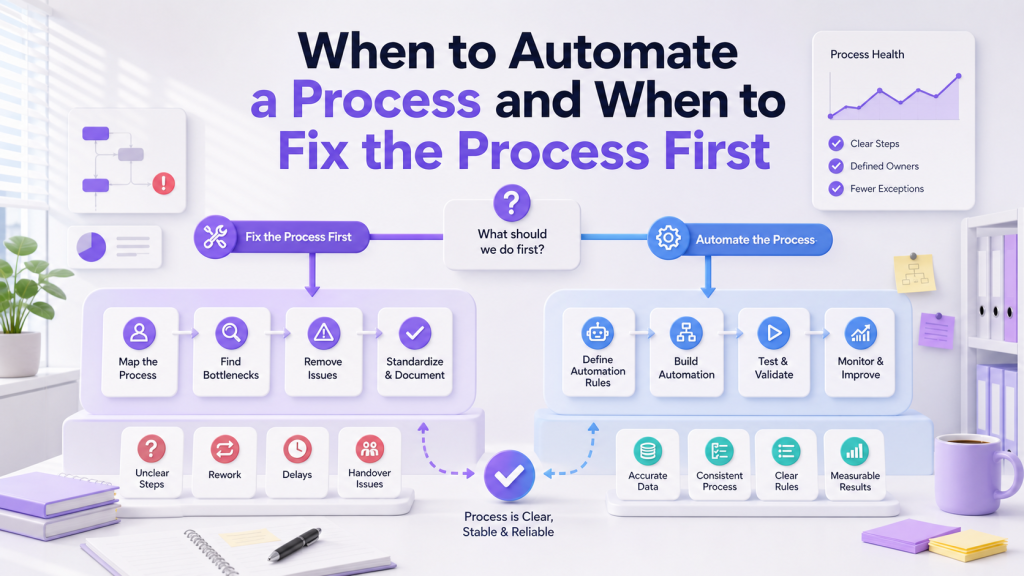
Automation is attractive because it promises faster work, fewer reminders, and better visibility. For busy SME teams, it is natural to ask whether a slow process can be improved by adding automation. Sometimes the answer is yes. But sometimes the process needs to be fixed first. Automating too early can lock in bad habits, send work to the wrong people, or make a messy workflow harder to understand. If the answer is not obvious, it may help to assess the workflow the way an implementation partner such as ClickSmart would: is the process clear, are the rules predictable, and is the team already using it consistently? That simple diagnosis can show whether the next move should be automation, simplification, redesign, or better team training.
Automate When the Process Is Clear and Repeated
A process is usually ready for automation when the steps are already understood. The team knows what happens first, who owns each step, what information is needed, and what the expected output looks like. Good automation candidates often include:
These processes are repeated often and usually follow predictable rules. Automation can reduce manual chasing because the workflow already has a stable structure.
Fix the Process First When Ownership Is Unclear
If nobody agrees who owns the next step, automation should wait. A rule that assigns a task to the wrong person only creates faster confusion. This is common in growing businesses where work crosses departments. Sales may pass work to operations, operations may wait for admin, and managers may only step in when a problem becomes urgent. Before automating, clarify:
Once ownership is clear, automation can support the handoff instead of guessing it.
Automate When the Rules Are Predictable
Automation works well when the business can describe the rule simply. For example:
These rules are easy to test and explain. They also make sense to staff because the logic matches the workflow. If the process needs too many special cases, it may not be ready for automation. The business may need to simplify the rule first.
Fix the Process First When Information Is Missing
Automation cannot make good decisions from poor information. If request forms are incomplete or staff do not update task details, the system will still struggle. For example, an approval workflow may fail because the requester does not include the amount, reason, supporting file, or deadline. Sending the request automatically to a manager will not fix the missing context. Before automating, define the required fields:
Automate When Manual Work Is Repetitive
Automation is most useful when it removes repeated admin work. This includes copying information, creating the same task again, sending the same reminder, or updating the same dashboard. For Malaysian SMEs, practical examples include:
Fix the Process First When People Avoid the System
If staff avoid the current workflow, automation may not solve the problem. The team may be avoiding the system because it is too complicated, too slow, or not useful for daily work. Look for signs such as:
In this case, the workflow should be simplified before automation is added. A simple process that people follow is better than an advanced system they avoid.
Use a Simple Decision Test
Before deciding, ask three questions. First, is the process clear? If not, fix the workflow first. Second, is the process repeated often? If yes, automation may be useful. Third, will automation reduce real manual work? If it only adds notifications without improving ownership or visibility, it may not be worth building yet. This decision test helps SMEs avoid automation for the sake of automation.
Conclusion
Automation is useful when the workflow is clear, repeated, predictable, and already followed by the team. It can reduce chasing, improve visibility, and make routine work easier to manage. But when ownership is unclear, information is missing, or staff avoid the system, the process should be fixed first. The best digital setup starts with operational clarity, then uses automation to support the way the team should work. If you are unsure whether your process is ready to automate, ClickSmart can review your workflow and advise the right next step. Book a free consultation to get started.
Frequently Asked Questions