How to Standardize Recurring Work With Automation Rules
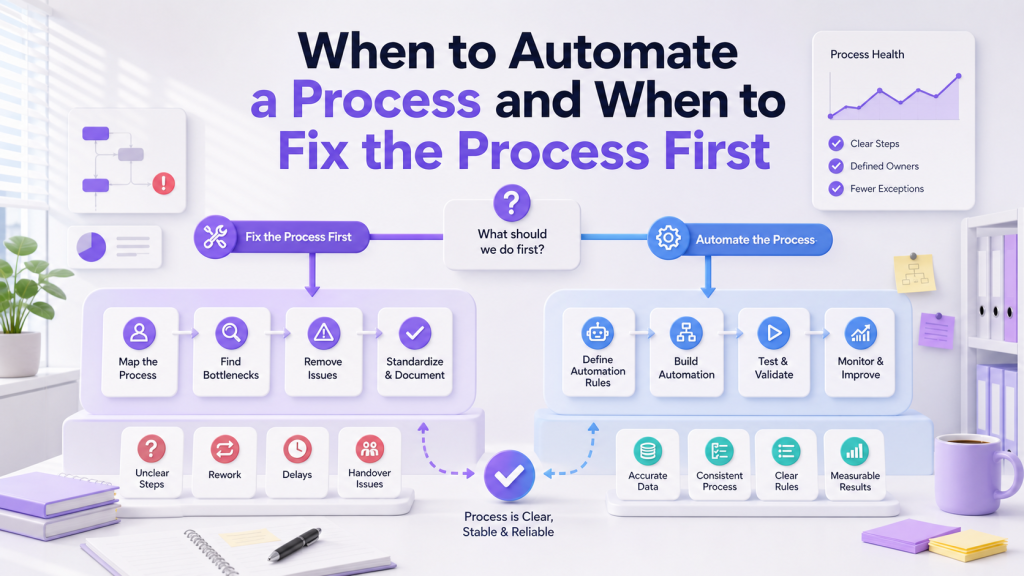
Recurring work is part of every growing business. Weekly reports, monthly billing checks, stock reviews, staff onboarding steps, client follow-ups, and internal requests all happen again and again. When these routines depend on memory, small gaps become common. The team may forget a checklist, miss a reminder, or recreate the same task manually each time. As the business grows, recurring work needs a more reliable structure. For businesses that want recurring work to run more reliably, it helps to step back and design the routine before adding rules. This is where ClickSmart can support the thinking process: clarify what triggers the work, who owns it, what checklist must be followed, what deadline applies, and what output should be produced, so tools like ClickUp, Lark, Meegle, or a connected operating system are supporting a real standard instead of replacing memory with reminders.
What Recurring Work Really Needs
Recurring work is not just a repeated task. It is a repeated responsibility that should happen in the same way each time. A good recurring workflow should answer:
Once these details are clear, automation rules can help the workflow run more consistently.
Start With the Trigger
Every recurring workflow needs a trigger. The trigger tells the system when to create the task, notify the owner, or move work to the next stage. Common triggers include:
For example, a monthly reporting task can be created automatically on the first working day of the month. A client review task can be created when a project status changes to Completed. The trigger should be simple and predictable. If the trigger is unclear, the automation may run at the wrong time or create tasks the team does not need.
Standardize the Task Template
A recurring task should not be empty. If staff still need to remember what to do, the workflow is only partly standardized. A useful recurring task template includes:
This is especially helpful for admin, finance, HR, operations, and sales teams. A repeated workflow becomes easier to follow when the same task structure appears each time. A structured project management system can support this by keeping recurring tasks, owners, checklists, and reporting views in one place.
Use Automation Rules to Reduce Chasing
Automation rules should remove repeated manual follow-up. They should not replace judgement or create unnecessary alerts. Practical automation rules may include:
These rules are useful because they support the routine without making it complicated.
Keep Exceptions Visible
Recurring workflows often fail because exceptions are hidden. A task may be delayed, blocked, missing files, or waiting for approval. If nobody sees the exception, managers only find out later. Build simple statuses into the workflow:
These statuses help managers review the work without asking every person for updates. They also give the team a shared language for progress.
Avoid Over-Automating the Routine
It is tempting to automate every small step, but too many rules can make the workflow fragile. If one condition changes, the whole routine may behave unexpectedly. Start with the few rules that create the most value:
After the team uses the workflow for a few weeks, review whether more automation is needed. This keeps the system practical and easier to maintain.
Train the Team on the Standard
Standardization only works when people understand the standard. The team should know what the recurring task means, what must be updated, and where to check progress. Training can be simple:
ClickSmart's integration and automation service often includes this practical training layer because the best automation still depends on consistent team usage.
Review the Routine Regularly
A recurring workflow should improve over time. After a month or two, review whether the routine still matches how the business works. Ask:
If the routine no longer fits, adjust the process before adding more rules.
Final Thoughts
Recurring work becomes easier to manage when the business standardizes the routine first. The trigger, owner, checklist, deadline, and expected output should be clear before automation is added. For Malaysian SMEs, this approach reduces missed tasks, repeated chasing, and inconsistent execution. Automation rules are most useful when they support a routine the team already understands. If your team is ready to standardize recurring work properly, ClickSmart can map the routines and configure the right automation rules. Book a free consultation to get started.
Frequently Asked Questions